If you run Meta ads for a forex broker, a crypto exchange, an iGaming operator or a signals channel, your real conversion almost never happens on a website. It happens inside Telegram. A user taps your ad, lands in a channel or a bot, and from there they either deposit, copy a trade, or go quiet. The problem is that Meta has no idea any of that happened. Without conversion tracking, your campaigns are optimising for link clicks and landing-page views while the metric you actually get paid on, the Telegram join that turns into a first-time deposit, stays invisible.
The good news: that invisible step is exactly what Ott was built to make visible. This piece explains how Telegram conversion tracking works for Meta advertising in regulated finance verticals — how joins are attributed back to a specific ad using the Facebook Click ID, how those events get fed back into Meta through the Conversions API — and why running it on a platform built for the job beats stitching it together yourself.
Why Telegram joins are the conversion that matters
In e-commerce, the conversion is a purchase on a page Meta’s pixel can see. In finance verticals, the funnel breaks the moment a user leaves Meta for Telegram. The pixel can’t follow them into a channel, so the join, the highest-intent action in your funnel, is dark.
That gap creates three concrete problems for media buyers:
- You optimise for the wrong thing. Meta’s algorithm chases whatever signal you feed it. If all it sees is “landing page view”, it finds people who click, not people who join and deposit.
- Cost-per-join and cost-per-FTD are guesses. You know spend and you know total joins, but you can’t tie a join to the ad that drove it. Allocating budget becomes vibes, not data.
- Scaling is blind. When a campaign looks cheap on cost-per-click but expensive on cost-per-Telegram-join, you only find out weeks later, after the budget is gone.
Closing that gap is the entire point of Telegram tracking built for finance agencies. It turns a dark step into a measurable conversion event Meta can optimise toward.
How fbclid attribution works for Telegram
The mechanism that makes this possible is the Facebook Click ID, or fbclid. When someone clicks a Meta ad, Meta appends an fbclid parameter to the destination URL. That ID is the thread connecting a specific click, on a specific ad, to whatever happens next.
Conceptually, the fbclid has to stay attached to a user from the moment they tap the ad to the moment they land in your channel. The click ID is captured up front, carried across the hop into Telegram, matched back to the join on the way in, and then reported to Meta as a conversion event with the fbclid attached so the right ad, ad set and campaign get credit. When that thread holds, a join stops being an anonymous number and becomes attributable down to a single creative.
The detail that trips people up: a raw Telegram invite link carries no click data. You cannot just paste t.me/yourchannel into an ad and expect attribution. Keeping the fbclid intact across a redirect and into the join, matching it reliably, and not losing or double-counting events along the way is fiddly, fragile work.
Ott carries the fbclid from the ad tap through to the join automatically, down to the individual creative — so per-ad Telegram attribution is something you read in a dashboard, not plumbing you build and babysit.
Sending joins back to Meta with the Conversions API
Capturing the join is half the job. The other half is getting it back into Meta so the algorithm can act on it. That’s the Conversions API (CAPI), Meta’s server-to-server channel for sending conversion events directly, without relying on a browser pixel.
CAPI matters more in finance than almost anywhere else, for three reasons:
- There is no page to fire a pixel on. The conversion happens inside Telegram, off the web entirely. Server-side is the only way to report it.
- Signal loss is brutal in regulated niches. Between iOS restrictions, ad blockers and privacy browsers, browser-side tracking leaks badly. Server events are far more reliable.
- Match quality drives optimisation. CAPI lets you pass hashed identifiers and the
fbclidso Meta can match the event to the original click and feed its learning phase real outcomes.
Ott fires the CAPI postback for every attributed join as a custom conversion, so you can finally do the thing that was impossible before: tell Meta to optimise for Telegram joins, or even for downstream events like first-time deposits, instead of cheap clicks that never convert.
What this looks like running on Ott
The mechanics above are vendor-neutral. The difference between a clean setup and a fragile one is how much manual plumbing you have to maintain. On Ott, the attribution layer is handled for you — you connect, you map, and the joins start reporting. Here’s the shape of it.
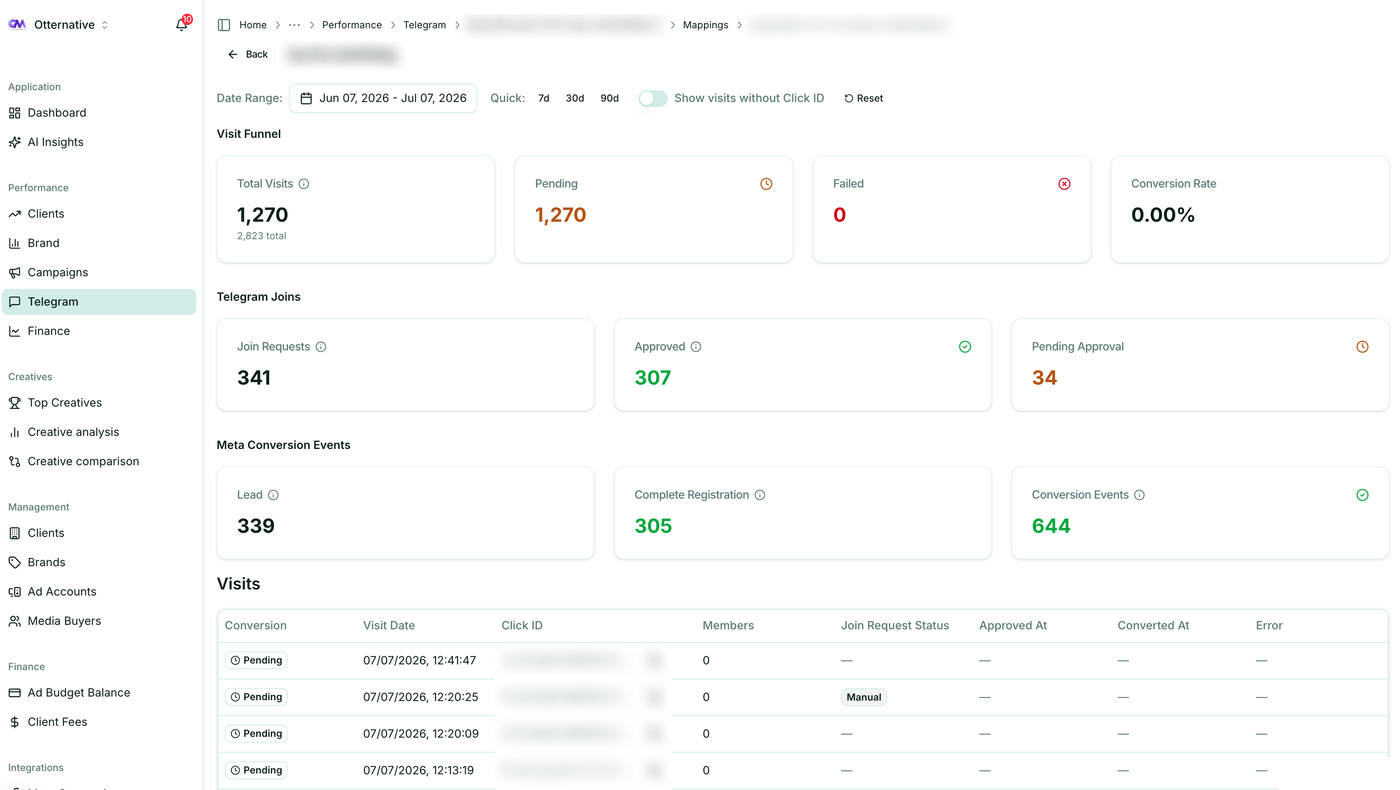
- 1
Connect your channels
A proper setup links each Telegram channel or bot you run to the platform that will watch for joins. The point is that join events get detected the moment they happen, without you stitching together scripts or babysitting a webhook. Ott handles the connection so joins start registering automatically.
- 2
Map ads to channels and brands
Each channel needs to map to the Meta ad account driving traffic to it, so joins and CAPI events land against the right ad. In an agency setup this is where a proper client and brand hierarchy earns its keep. You’re rarely tracking one channel — you’re tracking five brands across three Business Managers, and the mapping is what keeps them from bleeding into each other.
- 3
Attribution happens automatically
Once channels and ads are mapped, the
fbclidthread is captured and carried through to each join for you, down to the individual creative. That per-ad resolution is what makes analysing which creatives actually convert possible — without it, cost-per-join is a blended average that hides your best and worst ads. - 4
Read cost-per-join next to cost-per-FTD
With joins attributed and flowing back to Meta through CAPI, the numbers that were guesses become real. You see cost-per-join and cost-per-FTD side by side, per ad and per brand, so budget decisions rest on deposit quality instead of click volume — no per-funnel plumbing to test and re-test before every scale-up.
Reading the numbers that matter
Once joins are attributed and flowing into Meta, the metrics that were guesses become real:
- Cost per Telegram join, broken down by campaign, ad set and ad, so you can kill the expensive ones.
- Cost per FTD, by connecting joins to first-time-deposit tracking. A channel that’s cheap to join but never deposits is worse than a pricey one that does.
- Join-to-deposit rate, which tells you whether a traffic problem is a creative problem or a funnel problem.
- Per-brand and per-buyer performance, so an agency can see which client campaigns and which media buyers are actually producing deposits.
This is also where flat pricing changes behaviour. Telegram-only trackers typically charge a percentage of ad spend or a per-event fee, which quietly punishes you for scaling exactly the campaigns that work. A flat-fee platform lets you track every join across every brand without a meter running, so you optimise for results instead of for keeping the tracking bill down.
Where a tracker stops and an agency platform starts
Telegram attribution is necessary, but on its own it’s a single number in a dashboard you don’t otherwise use. The reason finance agencies consolidate is that joins only mean something next to spend, budgets, FTDs and campaign health. A standalone tracker tells you a join happened. It doesn’t tell you the campaign that drove it is also overspending, or that a brand is about to blow its prepaid budget.
That’s the gap between a point solution and a platform built for the work. If you’re weighing options, the comparison with TGTracker and with ClickGram lays out where single-purpose tools stop, and the roundup of Telegram ad tracking tools covers the wider field. For a deeper look at the niche, the pages on forex agencies and iGaming operators go vertical by vertical.
Get joins out of the dark
If your Telegram joins are still invisible to Meta, you’re paying for traffic you can’t optimise and reporting on a number you can’t trust. Attributing joins via the fbclid, sending them back through CAPI, and reading cost-per-join next to cost-per-FTD is the difference between scaling on data and scaling on hope.
You can have Telegram tracking, Meta analytics and FTD reporting running in one place in minutes. Start a free trial, no credit card required, or book a demo and we’ll walk through your funnel with you.