If you run Meta ads for a forex broker, a crypto exchange, an iGaming operator or a signals channel, your most important conversions almost never happen on the page where the Pixel fires. A first-time deposit lands in a trading platform. A Telegram join happens inside the app. A KYC approval comes back hours later from a compliance team. The browser Pixel was never built to see any of that, and iOS privacy changes have only made it blinder — which means every campaign you optimise on Pixel-only data is optimising toward the wrong thing.
This is the real stakes of the Pixel versus Conversions API question for finance verticals: it is not an academic tracking debate, it is whether Meta learns to find depositors or just clickers. For a Shopify shop, the Pixel still catches most purchases on a checkout page. For a regulated-niche advertiser, the conversion that actually pays your client happens off-Meta, off-browser, and often off-device. Ott is built to close exactly that gap — it runs the Pixel and the Conversions API together, deduplicated, per ad, including the off-site Telegram joins and FTDs neither of them sees on its own. Here is why that matters for your cost-per-FTD, and why wiring CAPI yourself is the hard way to get there.
What the Meta Pixel actually captures (and what it misses)
The Meta Pixel is a JavaScript snippet that fires in the user’s browser and reports events like PageView, Lead and Purchase back to Meta. It is fast to install and it gives you real-time feedback in Events Manager. That is where its usefulness ends for a finance funnel.
For finance advertisers, the problem is structural, not just technical:
- The money event is off-site. A forex deposit happens inside MT4/MT5 or a broker’s own funding flow. The Pixel on your landing page has no visibility into whether that deposit ever cleared.
- Telegram joins are invisible to the browser. When a media buyer drives traffic from a Meta ad to a Telegram channel, the join completes inside Telegram. No browser, no Pixel, no event.
- Privacy features eat your data. iOS App Tracking Transparency, Safari ITP and ad blockers all suppress or strip the browser-side signal. In high-risk verticals where audiences are privacy-conscious and frequently on mobile, the loss is heavier than the Meta-wide averages suggest.
So the Pixel can tell you someone clicked through and viewed a page. It usually cannot tell you the one thing your client pays for: did this ad produce a funded account. That is precisely the event Ott captures for you and feeds back to Meta — the deposit and the Telegram join, not the page view.
What the Conversions API does differently
The Meta Conversions API (CAPI) sends events server-to-server, from your infrastructure straight to Meta, with no dependency on the user’s browser. Instead of waiting for JavaScript to fire, you report the conversion from wherever it genuinely happens.
That maps almost perfectly onto a finance funnel:
- FTD confirmed in the broker backend? A server-side event fires the moment the deposit clears, with the deposit value attached.
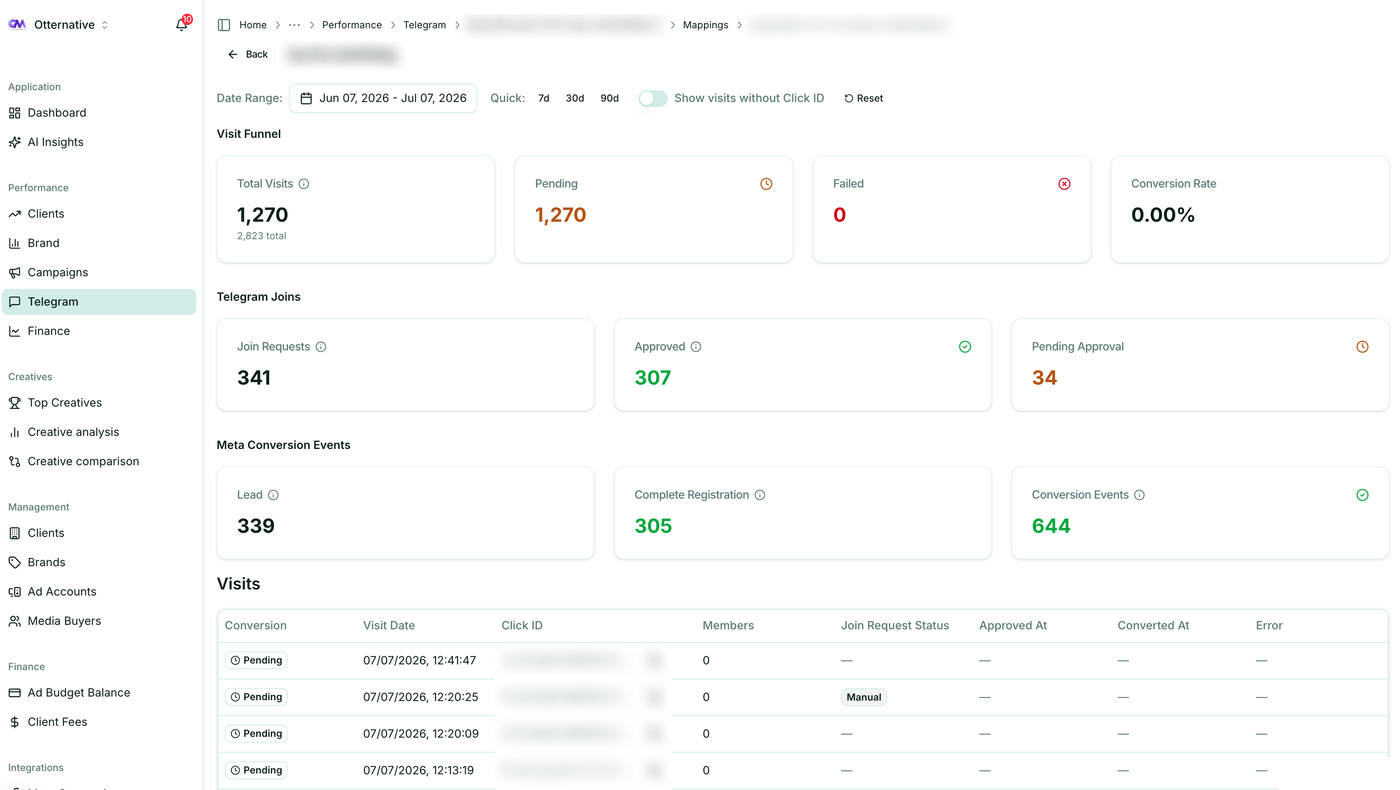
- Telegram join attributed to an ad click? The join is matched back to the originating Facebook Click ID (fbclid) and sent to Meta as a custom conversion via CAPI.
- KYC approved three hours later? It is reported when it happens, not when the page loaded.
Because CAPI is not in the browser, ATT, ITP and ad blockers do not break it. You also control the payload, so you can send richer matching parameters and the actual deposit amount rather than a generic event. For regulated verticals where Business Manager bans are a constant threat and ad accounts get rebuilt regularly, a server-side source of truth that you own is far more durable than a snippet sitting on a domain that might get flagged.
The catch is that “your infrastructure” is doing a lot of work in that sentence. Standing up CAPI properly means building the fbclid capture, the event matcher, the deduplication layer and the broker-to-Meta payload — and then maintaining it across every brand and ad account you run. Telegram conversion tracking in Ott is that whole mechanism as a product: the fbclid captured on the ad click is matched to the Telegram join, then pushed back to Meta through the Conversions API so the algorithm can optimise toward people who actually join, not just people who click — with nothing for you to build.
Pixel vs Conversions API: the finance-niche comparison
| Meta Pixel | Conversions API | |
|---|---|---|
| Data source | Browser JavaScript | Your server |
| Survives ad blockers | ✗ | ✓ |
| Survives iOS ATT / Safari ITP | ✗ | ✓ |
| Sees off-site FTDs | ✗ | ✓ |
| Sees Telegram joins | ✗ | ✓ |
| Sees delayed KYC approvals | ✗ | ✓ |
| Sends deposit value + rich match params | Limited | Full control |
| Survives Business Manager bans | ✗ | ✓ |
| Setup effort | Paste and go | Server work / connector |
Visibility into the real conversion
The Pixel sees browser events on your domain. The Conversions API sees whatever you choose to report, including FTDs, qualified leads, Telegram joins and KYC approvals that live entirely outside the browser. For finance agencies, CAPI is the only method that reaches the events that matter — and Ott is the layer that reports them per ad without you stitching brokers to Meta by hand.
Resistance to privacy and bans
The Pixel degrades under ATT and ITP and disappears entirely when a domain or Business Manager gets restricted. CAPI runs server-side, survives browser privacy changes, and keeps reporting even while you migrate ad accounts after a ban. Because Ott owns that server-side source of truth for you, your conversion history does not evaporate the moment an ad account does.
Attribution quality
The Pixel relies on cookies and browser matching, which finance audiences routinely block. CAPI lets you send hashed email, phone, IP, user agent and the fbclid, which dramatically improves Meta’s match rates and gives the optimisation algorithm cleaner signal for cost-per-FTD bidding. Ott sends those enriched match parameters on every conversion by default, so your match quality is a setting, not a project.
Setup effort
The Pixel wins on simplicity: paste and go. Raw CAPI needs server work to map your funnel events — and it is the harder setup precisely because it is the one that measures revenue. This is the line where most finance agencies stall. Ott collapses it: connect Meta, connect your channels, and the deduplicated Pixel-plus-CAPI pipeline runs across every brand with no engineering on your side.
Why finance agencies must run both
The answer is not “pick CAPI.” It is “run both, deduplicated.” Each source covers the other’s blind spots.
- Redundancy. If the Pixel is blocked, CAPI still reports. If a server event is delayed, the Pixel may have already captured the top-of-funnel signal.
- Match enrichment. Browser signals from the Pixel and server signals from CAPI together raise Meta’s match quality, which improves attribution and lowers your effective cost-per-acquisition.
- Full-funnel picture. The Pixel handles the click and page view; CAPI handles the deposit and the Telegram join. Stitched together, you get the complete path from ad to funded account.
Meta deduplicates automatically when both sources send the same event with a shared Event ID, so you are not double-counting your FTDs. This dual setup is also what keeps campaign triage honest: if your alerts are driven by browser-only conversion data, you will pause winning campaigns that look dead simply because the Pixel never saw the deposits. Ott runs both sources deduplicated so your triage decisions are made on funded accounts, not browser noise.
What running both correctly actually requires
“Run both, deduplicated” is easy to say and genuinely hard to operate. Under the hood, a correct finance setup has to do all of the following, for every brand, without drift:
- Capture and persist the fbclid at the moment of the ad click, so a Telegram join or FTD hours later can still be attributed to the exact ad that drove it.
- Report the real money events server-side — the FTD with its deposit value, the Telegram join, the KYC approval — from wherever they happen, not from the landing page.
- Deduplicate with a shared Event ID so any event that exists in both the browser and the server is counted once, not twice.
- Enrich every event with hashed email, phone, IP, user agent and the fbclid, because match quality is what lets Meta bid toward depositors.
- Reconcile against the broker’s deposit log so your reported FTDs and Meta’s numbers actually agree.
None of these steps is exotic on its own. The cost is running all of them together, correctly, across a dozen brands and ad accounts that keep getting rebuilt — and keeping them reconciled with your FTD KPI tracking. That is the maintenance burden Ott exists to remove: connect your accounts once and the fbclid capture, deduplicated dual tracking, enriched matching and reconciliation run as a managed pipeline.
The common mistakes that cost finance agencies money
- Pixel-only tracking. You optimise toward page views and clicks while your client optimises toward funded accounts. The two diverge fast in high-CPM finance auctions.
- Sending events without deposit value. A generic
Purchasewith no value robs Meta of the signal it needs to bid toward high-LTV depositors. Send the amount. - No fbclid capture. Without the click ID stored at the moment of the ad click, you cannot attribute a later Telegram join or FTD back to the specific ad. Capture and persist it early.
- Forgetting deduplication. Same event from both sources without a shared Event ID inflates your conversion count and quietly ruins your cost-per-FTD reporting.
Every one of these mistakes is a symptom of the same root cause: a single tracker bolted onto a spreadsheet stack. Tracking the Telegram join is one event; tying it to the ad, the brand, the client and the deposit — and deduplicating it against the Pixel — is the part that actually runs an agency. That is the difference between a point tool and a platform built for forex and finance agencies. Ott handles all four of these by design, so they are not mistakes you can make in the first place.
Let Ott run CAPI and the Pixel for you
Meta Pixel and the Conversions API are not competitors. The Pixel gives you browser-side speed; CAPI gives you the server-side truth about deposits and Telegram joins that finance campaigns actually run on. The winning setup is both, deduplicated with a shared Event ID, with deposit values sent and every Telegram join attributed through the fbclid — the question is only whether you build and babysit that yourself or let a platform do it.
Ott captures the fbclid, matches Telegram joins and FTDs, and pushes them back to Meta via the Conversions API — deduplicated against the Pixel, per ad, all under one client → brand → ad account hierarchy at a flat monthly fee with no per-Telegram-join charges. That is dual tracking done for you instead of assembled by you. Start a free trial or talk to us about wiring up your finance funnel.